 Token Controller
Bills and reconciliation
When you use AI agents, you may get bills from more than one provider, or two bills from the same one, such as an API account and a seat plan. A bill is what a provider charged you under one contract over a date range: contract, first and last day, amount, currency. A metered contract, such as an API account, bills per use. A flat contract, such as a seat plan, bills its fee plus any extra usage. This page shows how to bring bills in and check each one against what your agents used.
What is reconciled
| Provider | How to connect | The bill is | Figures are final |
|---|---|---|---|
| Anthropic, Enterprise plan, usage at API rates | Enterprise Analytics API key | The cost report at list price | About 30 days after the month ends |
| Anthropic Console or API keys | Console Admin API key | The Usage and Cost report, per workspace and day | When the month ends |
| OpenAI API | OpenAI Admin key | The Costs API, per day, project and API key | When the month ends |
| Bedrock, Vertex, Foundry | The cloud's export as CSV, or a connector on an Enterprise plan contract | The cloud's export | On upload |
| Anything else | CSV, typed in by hand, or the bills endpoint | That bill | On upload |
| Seat plans, such as Claude Team, Max or Pro | Typed in under a flat contract, with the fee and any extra usage | The plan's invoice | On entry |
Connecting a provider
All keys are added under Bills, Connect. A connected provider is pulled once a day for the last 62 days; Pull now pulls at once. A pulled bill goes to the provider's only metered contract, or, while there is none or more than one, to a contract named after the provider, such as anthropic, which the first bill creates.
Anthropic Enterprise
For organizations on Anthropic's Enterprise plan, billed for usage at API rates. The organization's primary owner creates an Enterprise Analytics API key in claude.ai under Organization settings, API, with the read:analytics scope. Anthropic's figures become final about 30 days after the month ends; until then the bill is marked not final.
Anthropic Console
For organizations that pay Anthropic per token through the Console or API keys. An organization admin creates an Admin API key (it starts with sk-ant-admin) in the Claude Console. Token Controller reads the Usage and Cost report, per workspace and day.
OpenAI
For organizations that pay OpenAI for API usage. An organization owner creates an Admin key (it starts with sk-admin-) under Organization settings, Admin keys. Token Controller reads the Costs API.
CSV
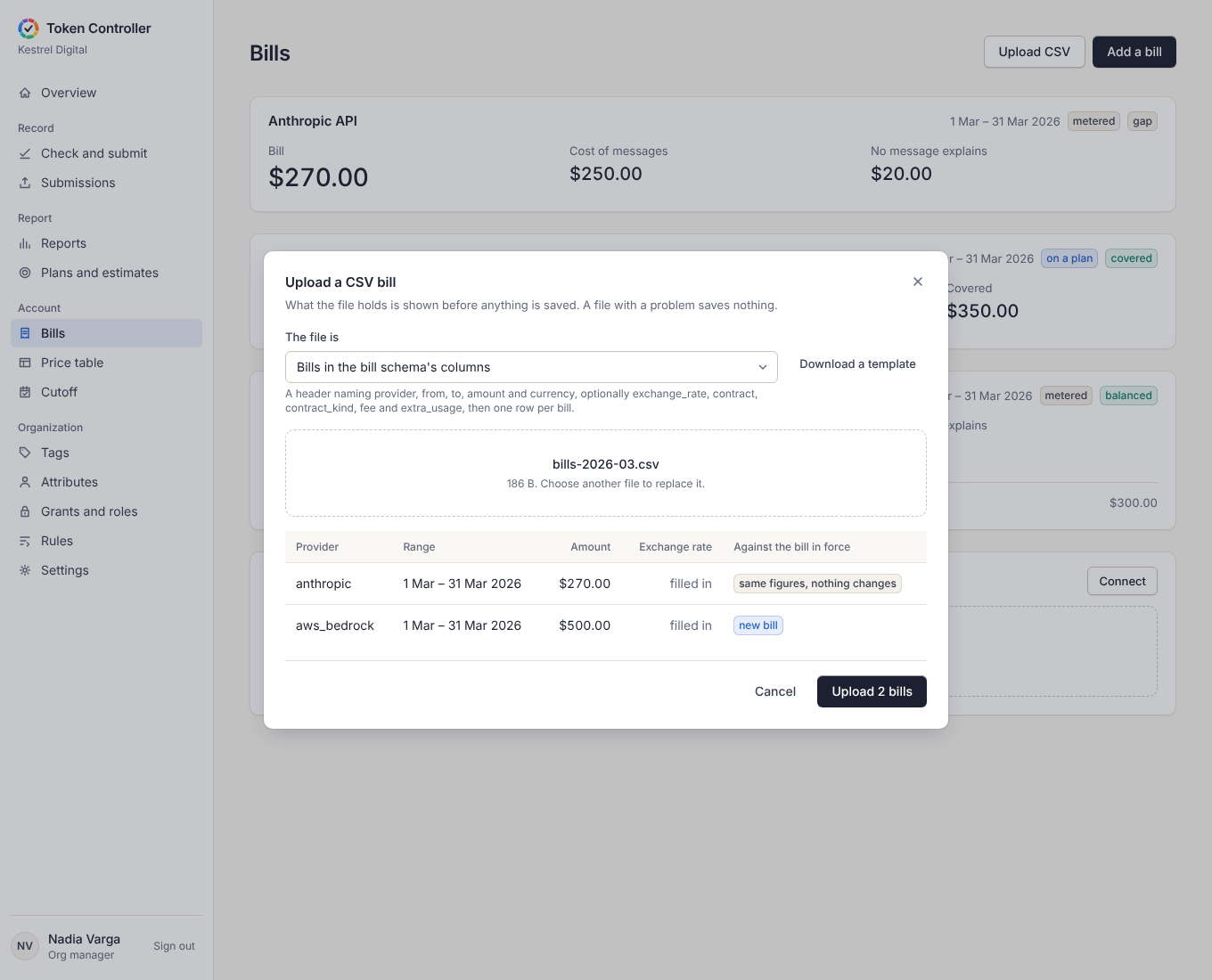
Any bill can be uploaded as CSV, and this is the way for Bedrock, Vertex and Foundry. Under Bills, choose Upload CSV and give the provider, the contract, first and last day, amount and currency (see the bill fields), or upload the cloud's own cost export. The upload shows what it read before anything is saved: each bill in the file, the contract it goes to, and whether it is new, restates the bill in force for that contract, or has the same figures. A file with a problem names the row and column and saves nothing.
By hand
For a seat plan or any bill no API reports, choose Add a bill. Pick the contract, or leave The provider's only contract, or name a new one with its kind, metered or flat. For a flat contract, give the fee or the extra usage too; either is enough, since the bill is their sum.
Restated bills and currency
A provider can restate a bill. The new figure is a new bill event for the same contract and range; the old one is reversed and stays visible. A pull with the same figures changes nothing. A bill in another currency keeps its own amount and the exchange rate of its last day.
Reconciliation
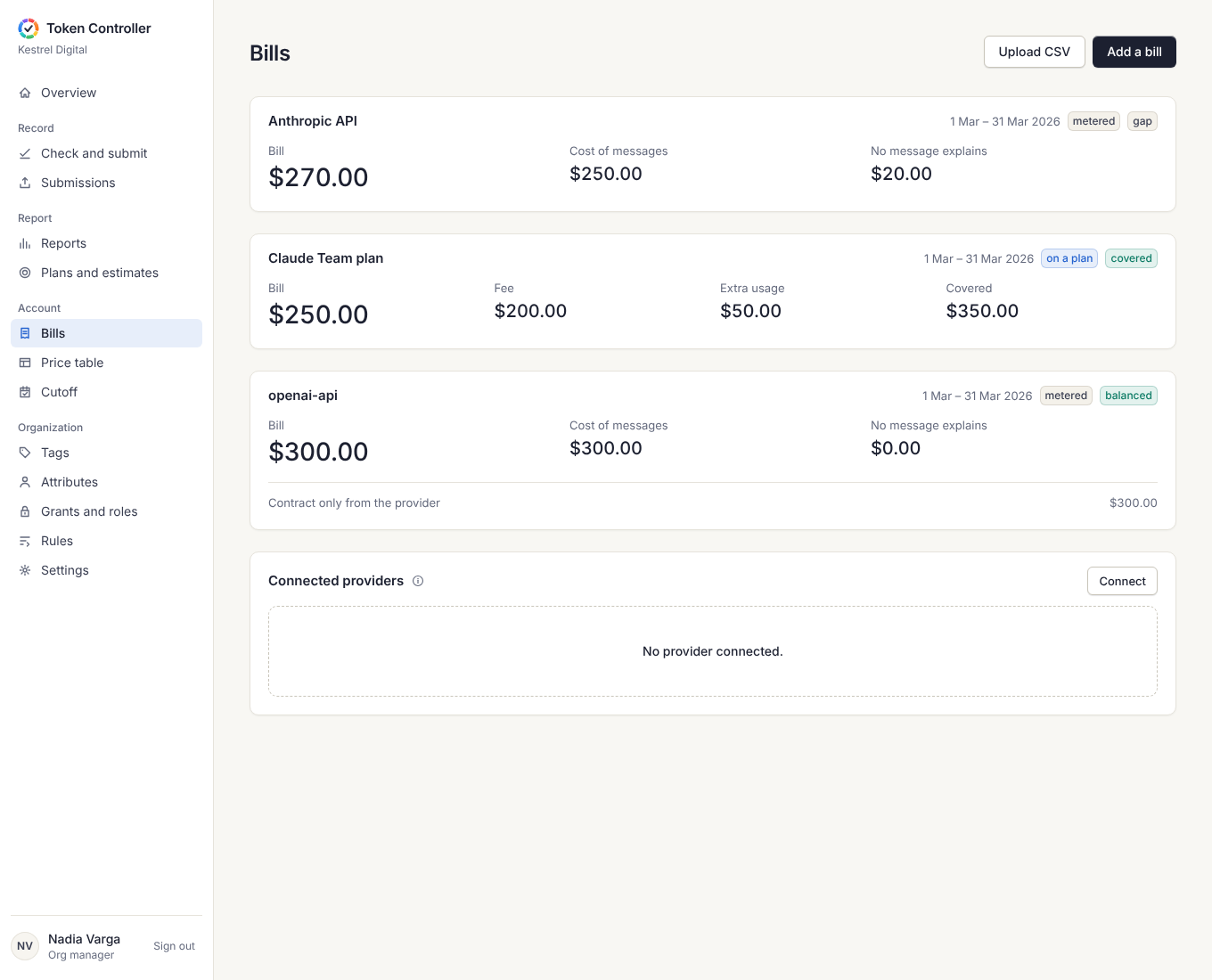
Each bill has one contract, and the check runs on the bill's own date range against the messages with the same contract:
| Contract | Check |
|---|---|
| Metered | Bill = cost of the messages with this contract in the range + what the bill has that no message explains |
| Flat | Bill = fee + extra usage. The cost of its messages minus extra usage is covered by the plan. |
What no message explains is a line on the bill: usage in the provider's own chat app, or per-call fees the agent does not report. It must be zero or positive. Negative means a message is wrong: a wrong count, a wrong model, a price row that is too high, or a message under the wrong contract. Find it and reverse it.
Beside every check you see the messages of the same provider that have no contract yet, and those whose contract came only from the provider having one contract. How a message gets its contract is on the data model page, and the worked month checks three bills.
Under the checks, Contracts lists every contract of the organization with its provider, whether it is metered or on a plan, and a flat contract's fee per month.
As of
A bill is an event like every other. A reconciliation as of the cutoff uses the bills and messages known then; a restated bill after the cutoff shows as of today and waits for an org manager to adjust it in.